
01 foundation
Why I'm Building a Functional Rendering Lab in C#
Motivation and context. Limitations of existing engines, friction with OOP, rendering as data transformation, and the Functional Core + Imperative Shell pattern.
Why I’m Building a Functional Rendering Lab in C#
A rendering engine built for learning, not shipping — and why functional architecture is the foundation.
I Learned to See Light Before I Learned to Code
I didn’t come to rendering through computer science. I studied Industrial Design, and one of the courses required us to produce realistic renders in Blender. Most students treated it as a checkbox — set up lights, apply materials, hit render. But I had a teacher who refused to let us work that way.
This was before Blender had PrincipledBSDF, before you could drag a single slider and get “realistic.” Every material parameter had to be set by hand, and this teacher made sure we understood what each one meant. Roughness wasn’t a slider — it was a statistical distribution of microfacets on a surface. The difference between a metal and a plastic wasn’t just a toggle — it was the difference between a conductor that tints its reflections and a dielectric that doesn’t. Fresnel wasn’t a checkbox. It was physics.
Something clicked. I stopped caring about making images look right and started wanting to understand why light behaves. That shift — from using a renderer to wanting to build one — never went away.
I found my way into programming through Unity, invested in learning C# properly, and landed a job building VR applications in 2016. From there I grew into a technical lead, the kind of role where you bridge developers and managers more than you write shaders. I’ve touched rendering at every level since — custom Vulkan blits from hardware decoders into Unity, shader debugging in headsets, pipeline integration across teams.
But I’ve never built a complete rendering pipeline from scratch.
The Gap Between Touching the Pipeline and Owning It
There’s a difference between working with a rendering pipeline and understanding how one is actually built. I’ve spent years on the integration side — making rendering work inside someone else’s architecture, solving problems at the boundaries. But the core? How passes compose into a frame? How resource dependencies get resolved? How barriers get placed? That’s always been someone else’s code.
Engines like Unity and Unreal are extraordinary tools, but they’re black boxes for exactly the parts I want to understand. You can write custom shaders, hook into render passes, even replace whole pipeline stages. But you’re always working within constraints that someone else designed, and the why behind those constraints is buried in thousands of files you’ll never fully trace.
I remember going full-in once before. When I first discovered PBR rendering in Blender, I didn’t just learn how to use it — I studied the theory until I could explain every parameter from first principles. That depth of understanding changed how I saw everything afterward.
I want that again, but for the entire pipeline. Not building a game engine. Not shipping a product. Just a lab — a controlled environment where I can implement techniques, study papers, and understand every line from surface to screen.
So I decided to build one. But if I was going to start from scratch, I wanted to fix something else that’s been bothering me for years.
When Rotation Bugs Only Happen Inside a Headset
In VR, there’s a common UI pattern: panels that lazily follow your gaze. You turn your head, the panel smoothly rotates to stay in view after a short delay. It feels natural when it works. When it doesn’t, it’s nauseating.
The standard Unity approach is a MonoBehaviour — a component that reads the headset’s pose every frame and writes a new transform to the panel. A thing that does something. You tweak the smoothing parameters, test it in the editor with a mouse, and it looks fine. Then you put the headset on.
The panel follows the wrong rotation axis. Or the smoothing overshoots at high angular velocities. Or there’s a frame of jitter when the tracking prediction corrects itself. These bugs only exist at 90fps with real head tracking, in a device strapped to your face. You can’t reproduce them at your desk, you can’t unit test them, and you can’t graph them. You debug by putting the headset on, moving your head, and feeling whether the fix worked.
I dealt with this enough times to recognize the structural problem. The pose calculation and the side effects were fused into one component. The math that determined “how should this panel move” was tangled with the code that actually moved it. You couldn’t test the math without running the entire Unity runtime.
The fix was separating them. Extract the pose-state calculation into a pure function: given the current pose, the target pose, the delta time, and the smoothing parameters, return the new pose. No MonoBehaviour, no Transform, no Update loop. Just math.
The MonoBehaviour still exists, but it becomes a thin shell — read the headset pose, call the pure function, apply the result. Now you can test the smoothing at your desk. You can feed it synthetic input sequences and graph the output curves. You can assert that it converges, that it never overshoots by more than a threshold, that it handles zero-length quaternion edge cases. “Feel and smoothness” stopped being a subjective judgment call and became testable data.
The principle is simple: when you separate data transformations from side effects, mysterious runtime bugs become testable math.
I started applying this pattern everywhere — input handling, animation state, UI layout. Not because functional programming is ideologically superior, but because I wanted to sleep at night knowing my code worked.
Rendering Is Already a Data Transformation
Once you see the pattern, rendering is an obvious fit.
A frame is a pipeline of data transformations. Scene data goes in — geometry, materials, lights, camera. Pixel colors come out. Between input and output, each rendering pass reads some data, transforms it, and produces new data for the next pass. The geometry pass writes positions and normals to a G-Buffer. The lighting pass reads that G-Buffer and writes illuminated pixels. The tonemap pass reads HDR values and writes displayable colors.
The GPU is the ultimate side effect — a massively parallel machine that consumes your carefully described work and produces pixels on a screen. But the description of that work? That’s pure data. Which passes exist, what each one reads and writes, how they depend on each other — none of this requires a GPU to define or validate.
This is why I’m building the Functional Rendering Lab in C# with Vulkan, not inside Unity or Unreal. Existing engines hide the exact boundary I want to study: where pure description ends and impure execution begins. I need to see that boundary, draw it myself, and understand what lives on each side.
C# because it’s the language I know deepest and .NET 9 is genuinely fast enough for real-time rendering. Vulkan via Silk.NET because it exposes the pipeline at the right level of control — explicit enough to understand what the GPU is doing, without the hand-holding that would hide the decisions I want to make.
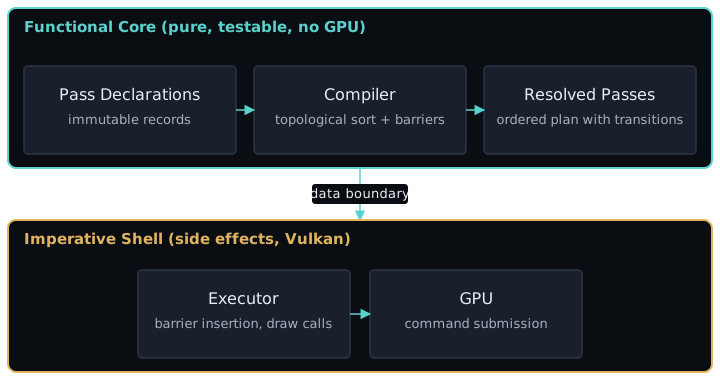
The architecture I’ve landed on is Functional Core, Imperative Shell — applied to rendering. The render graph is pure data: an immutable collection of pass declarations, each one describing its resource inputs, outputs, and how they’re used. A compiler takes those declarations and produces an ordered execution plan with the correct synchronization barriers. Zero side effects. Testable without a GPU.
The executor is the shell. It takes the compiled plan and translates it into Vulkan commands — pipeline binds, descriptor sets, draw calls, queue submissions. Every impure operation is isolated here, explicit and contained.
Everything testable is tested without a GPU. Everything impure is isolated and named.
Building in Public Because Teaching Forces Clarity
This project has two outputs: a rendering engine and a body of writing about building it. The blog posts are not an afterthought — they’re a forcing function.
When I implement a technique in code, I can gloss over the parts I half-understand. The compiler doesn’t care if I know why a barrier needs to transition from ColorAttachmentWrite to ShaderRead — it only cares that I got the enum right. But when I have to explain it in writing, every gap shows. Teaching forces clarity in a way that coding alone doesn’t.
The loop is simple: implement a technique, write about it, and let the writing expose what I didn’t fully understand. Then fix the understanding, fix the code, and move on to the next one.
What’s coming next: the minimal pipeline — from a blank window to a triangle on screen, proving the system can talk to the GPU. Then deferred rendering, where the render graph abstraction earns its keep. Then the first paper implementation — screen-space ambient occlusion — where the architecture proves it can grow without rewriting what came before.
This is not a tutorial series from an expert. It’s a public learning journey. I’ll be wrong sometimes, and I’ll say so when I figure it out. If you’ve ever wanted to understand rendering at this level but didn’t know where to start, you’re the person I’m writing for — because I’m starting from the same place.
The next post begins at zero: a blank window, a Vulkan device, and a single triangle. Let’s see what we can build.